Design Patterns CourseLesson 4 of 4 55 min
Behavioural Design Patterns in C#
Behavioural patterns are about how objects share out work and talk to each other while the program runs: which object decides, which one is told, in what order things happen and where an algorithm lives. The creational and structural patterns describe what exists and how it is connected. These describe what happens next.
This lesson covers the eleven behavioural patterns: Strategy, Command, Template Method, Chain of Responsibility, Observer, State, Iterator, Mediator, Memento, Visitor and Interpreter. This is the family where modern C# changes the most, because a behaviour can be passed around as a delegate. Each section gives the intent of the pattern in one line and then the smallest C# that expresses it. It ends with a short table of when to use the pattern, what it gives you and what it costs, and with where the pattern turns up in well-known low-level design (LLD) interview problems such as the parking lot, the elevator and the vending machine. The code is in the DesignPatterns-Using-Csharp repository.
Strategy
Intent: pick an algorithm at runtime without the caller knowing which one runs. The classic version needs an IStrategy interface and one class per algorithm. In C# a strategy is just a function, so Func<T, T> replaces the whole interface.
// Two ways to reverse a string, each one a lambda
Func<string, string> reverse1 = s => new string(s.Reverse().ToArray());
Func<string, string> reverse2 = s =>
{
    var chars = s.ToCharArray();
    Array.Reverse(chars);
    return new string(chars);
};

var strategy = new StrategyPattern<string>(reverse1, "Hello World");
Console.WriteLine(strategy.ExecuteStrategy());   // dlroW olleH
strategy.ChangeStrategy(reverse2);
Console.WriteLine(strategy.ExecuteStrategy());   // dlroW olleH

public class StrategyPattern<T>
{
    private Func<T, T> strategy;
    private readonly T input;

    public StrategyPattern(Func<T, T> strategy, T input)
    {
        this.strategy = strategy;
        this.input = input;
    }

    public void ChangeStrategy(Func<T, T> newStrategy) => strategy = newStrategy;

    public T ExecuteStrategy() => strategy(input);
}
Keep this one in mind. Almost every other "declarative" version in this course is the Strategy pattern in disguise: behaviour passed in as a delegate.
| Strategy | |
|---|---|
| Use it when | There are several ways to do one job and the choice is made at runtime or by configuration: sort orders, pricing rules, validation, retry policies. |
| Benefits | A new algorithm is added without touching the caller, each one can be tested on its own, and a chain of if and else on a type disappears. |
| Drawbacks | The caller has to know enough to choose a strategy. A lambda has no name and no state of its own, so once a strategy needs configuration or dependencies, a named class behind an interface reads better. |
In LLD problems: A parking lot has two: the fee calculation (hourly, flat rate, weekend) and the rule that picks a slot (nearest to the entrance, first free). Each can be swapped without touching the lot. In an elevator system, the rule that decides which car answers a hall call (nearest car, or the one already moving that way) is a strategy.
Command
Intent: wrap a request in an object so it can be stored, queued or looked up. The textbook version is an ICommand interface with Execute and Undo. When you only need Execute, a delegate already is a command, and a dictionary of them is a command table.
Func<int, int, int> add      = (x, y) => x + y;
Func<int, int, int> subtract = (x, y) => x - y;
Func<int, int, int> multiply = (x, y) => x * y;
Func<int, int, int> divide   = (x, y) => x / y;

var commands = new Dictionary<string, Func<int, int, int>>
{
    { "+", add },
    { "-", subtract },
    { "*", multiply },
    { "/", divide },
};

// Invoke plays the role of ICommand.Execute
Console.WriteLine(commands["+"].Invoke(1, 2)); // 3
If you need Undo, go back to a small interface or a record holding two delegates (Do and Undo). Don't build the class hierarchy until you need it.
| Command | |
|---|---|
| Use it when | A request has to be queued, scheduled, logged, retried or undone, or buttons and menu items have to be bound to actions. |
| Benefits | The code that triggers an action is separated from the code that performs it, and commands can be stored, replayed and combined into macros. |
| Drawbacks | There is one more object for every action. A bare delegate has no Undo and no name, and cannot be written to a queue or a log, so each of those needs brings the class back. |
In LLD problems: In an elevator system every button press becomes a request object that the controller queues and serves later, instead of a direct call to a car. In a text editor every edit is a command kept on a stack, which is what makes undo and redo possible.
Template Method
Intent: fix the skeleton of an algorithm in a base class and let subclasses fill in some steps. Here the base class owns the order (header, body, footer) and the body is the only step a subclass supplies. The template method itself is not virtual, so no subclass can change the order. Passing the body in as a Func<string> combines Template Method with Strategy, so one subclass serves every body.
Template template1 = new Template1(() => "body1");
Template template2 = new Template1(() => "body2"); // no new subclass needed
Console.WriteLine(template1.TemplateMethod());
Console.WriteLine(template2.TemplateMethod());

abstract class Template
{
    protected string Header() => "Header";
    protected string Footer() => "Footer";
    protected abstract string Body();

    // The skeleton lives in the base class and cannot be overridden
    public string TemplateMethod() =>
        Header() + Environment.NewLine + Body() + Environment.NewLine + Footer();
}

class Template1 : Template
{
    private readonly Func<string> body;
    public Template1(Func<string> body) => this.body = body;

    protected override string Body() => body();
}| Template Method | |
|---|---|
| Use it when | Several variants follow the same steps in the same order and differ in one or two of them: import pipelines, report generation, test fixtures (set up, run, tear down). |
| Benefits | The shared skeleton is written once, and no variant can change the order or skip a step. |
| Drawbacks | It is built on inheritance, so every variant is tied to the base class and can vary only at the steps the base class planned for. When many steps vary, pass them in as delegates instead. |
In LLD problems: Board games such as chess, tic-tac-toe and snakes and ladders share one loop: set up the board, take turns until someone wins, announce the result. The base class owns that loop and each game supplies the move and the win check. A parking lot exit follows a fixed order too (work out the fee, take payment, free the slot, open the gate), with only the payment step differing between cash and card.
Chain of Responsibility
Intent: pass a request along a chain of handlers. Each handler can process the request or hand it to the next one. This is the pattern behind middleware in ASP.NET Core.
The classic implementation uses an abstract handler with a Next reference and one subclass per handler:
//Chain Of Responsibility
Console.WriteLine("Chain of Responsibility");
var requestNo = 2;
var handler = new Handler1();
var handler2 = new Handler2();
handler.Next = handler2;
Console.WriteLine(handler.HandleRequest(requestNo));


internal class Handler1:Handler
{
    protected override int RequestNo { get; set; } = 1;
}
internal class Handler2 : Handler
{
    protected override int RequestNo { get; set; } = 2;
}
internal abstract class Handler
{
    protected abstract int RequestNo { get; set; }
    public  Handler? Next { get; set; }

    public string HandleRequest(int requestNo)
    {
        return requestNo == RequestNo ? SuccessMessage(requestNo) : NextMessage(requestNo);
    }
    protected string SuccessMessage(int requestNo) => $"Handler {requestNo} Handled the request";
    protected string NextMessage(int requestNo) => Next?.HandleRequest(requestNo) ?? "No Handler handled the request";
}
This works, but it needs a class for every handler and the intent is buried in plumbing. Microsoft took a different route when they built middleware for ASP.NET Core: each handler is a delegate that receives the request and a next function, and decides for itself whether to call it. Here is the same chain written that way. It is still Chain of Responsibility, with lambdas in place of handler classes:
var chain = new Chain();

chain.Use(async (requestNo, next) =>
{
    Console.WriteLine($"Logger: before request {requestNo}");
    await next();                                    // the rest of the chain runs here
    Console.WriteLine($"Logger: after request {requestNo}");
});
chain.Use(async (requestNo, next) =>
{
    if (requestNo == 1) Console.WriteLine($"Handler {requestNo} handled the request");
    else await next();
});
chain.Use(async (requestNo, next) =>
{
    if (requestNo == 2) Console.WriteLine($"Handler {requestNo} handled the request");
    else await next();
});
chain.Run(requestNo =>
{
    Console.WriteLine($"No Handler handled the request {requestNo}");
    return Task.CompletedTask;
});

await chain.Handle(2);
await chain.Handle(3);

public class Chain
{
    private readonly List<Func<int, Func<Task>, Task>> handlers = [];

    // Register only. Nothing runs yet.
    public Chain Use(Func<int, Func<Task>, Task> handler)
    {
        handlers.Add(handler);
        return this;
    }

    // Terminal handler: it is never given a next, so the chain ends here
    public Chain Run(Func<int, Task> handler) => Use((requestNo, _) => handler(requestNo));

    // Run the whole chain for one request. Call it as many times as you like.
    public Task Handle(int requestNo) => Invoke(0, requestNo);

    // next() is simply "invoke the handler after me"
    private Task Invoke(int index, int requestNo) =>
        index < handlers.Count
            ? handlers[index](requestNo, () => Invoke(index + 1, requestNo))
            : Task.CompletedTask;
}
Compared with the classic version, three things change. First, Use and Run only register handlers. Nothing runs until Handle is called, so one chain can process any number of requests. Second, next is not a Next property but a function that runs the rest of the chain, as () => Invoke(index + 1, requestNo) shows. A handler that does not call it stops the request there. Third, handlers are async, so they can await next() and wait on I/O, such as a database call, without blocking a thread.
Because await next() only returns once every later handler has finished, code written after it runs on the way back out. Handling request 2 prints:
Logger: before request 2
Handler 2 handled the request
Logger: after request 2
A request travels in through the handlers and back out through the same ones in reverse order. The classic version cannot do this: here a handler can do work both before and after the rest of the chain, which is useful for logging, timing a request or catching an exception thrown further down.
| Chain of Responsibility | |
|---|---|
| Use it when | A request passes through steps that may each handle it, change it or stop it, and the set or order of steps should be easy to change: middleware, validation, approval levels. |
| Benefits | The sender does not know which handler deals with the request. Handlers are small, and can be added, removed and reordered without changing the others. |
| Drawbacks | Nothing guarantees that any handler deals with the request. The order matters and is easy to get wrong (cache before authorise serves private data), and following one request through a long chain in a debugger is slow work. |
In LLD problems: An ATM or vending machine dispenses cash through a chain: the handler for the largest note gives out what it can and passes the remainder to the next smaller note. A logging framework passes each message along its handlers (console, file, alert), and each one decides by level whether to write it.
Observer
Intent: let many objects be notified when one object changes, without the publisher knowing what they do with the news. The hand-written version keeps a list of observers and loops over them:
public interface IPublisher
{
    void AddObserver(Observer observer);
    void RemoveObserver(Observer observer);
    void NotifyObservers();
}

public class Publisher : IPublisher
{
    private readonly List<Observer> observers = [];

    public void AddObserver(Observer observer) => observers.Add(observer);
    public void RemoveObserver(Observer observer) => observers.Remove(observer);

    public void NotifyObservers()
    {
        foreach (var o in observers) o.Update("Hello Subscriber");
    }
}
C# has the Observer pattern built into the language: an event is a list of subscribers, += subscribes and -= unsubscribes. The publisher shrinks to almost nothing:
internal class EventPublisher : IPublisher
{
    private event EventHandler<string> OnEvent = delegate { };

    public void AddObserver(Observer observer) => OnEvent += observer.Update;
    public void RemoveObserver(Observer observer) => OnEvent -= observer.Update;
    public void NotifyObservers() => OnEvent(this, "Hello Subscribers");
}

public class Observer
{
    private string? message;
    private IPublisher? publisher;

    // EventHandler<string> signature: the sender comes along for free
    public void Update(object? sender, string message)
    {
        this.message = message;
        publisher = sender as IPublisher;
    }

    public void Update(string message) => this.message = message;

    // Because the event passes the sender, the observer can unsubscribe itself
    public void RemoveSubscription() => publisher?.RemoveObserver(this);

    public void ProcessMessage()
    {
        Console.WriteLine("Received: " + (message ?? "No Message"));
        message = null;
    }
}
Notice that the event version hands the sender to every observer, so an observer can unsubscribe without being given the publisher again. In larger systems you would reach for IObservable<T> and Reactive Extensions, but the idea is the same.
| Observer | |
|---|---|
| Use it when | A change in one object has to reach others that it should not know about: data binding in a user interface, domain events, cache invalidation. |
| Benefits | The publisher and its subscribers are written and changed separately, and subscribers can come and go while the program runs. |
| Drawbacks | A subscriber that never unsubscribes is kept alive by the event, which is the most common memory leak in .NET. An exception in one handler stops the handlers after it, and the flow of control cannot be read from the publisher's code. |
In LLD problems: In a parking lot the display boards at the entrances subscribe to the lot and update the free count whenever a slot is taken or released. In a stock exchange or an auction, traders subscribe to an item and are notified when its price changes or they are outbid.
State
Intent: let an object change its behaviour when its internal state changes, as if it had changed class. The Context below delegates every call to its current state and then swaps to the other state.
var context = new Context(new State1(), new State2());
context.DoWork1(); // State1 DoWork1
context.DoWork2(); // State2 DoWork2

internal interface IState
{
    void DoWork1();
    void DoWork2();
}

internal class State1 : IState
{
    public void DoWork1() => Console.WriteLine("State1 " + nameof(DoWork1));
    public void DoWork2() => Console.WriteLine("State1 " + nameof(DoWork2));
}

internal class State2 : IState
{
    public void DoWork1() => Console.WriteLine("State2 " + nameof(DoWork1));
    public void DoWork2() => Console.WriteLine("State2 " + nameof(DoWork2));
}

internal class Context
{
    private IState state;
    private IState next;

    public Context(IState state, IState next) => (this.state, this.next) = (state, next);

    public void DoWork1() { state.DoWork1(); (state, next) = (next, state); }
    public void DoWork2() { state.DoWork2(); (state, next) = (next, state); }
}
Tuple swaps keep the transition to one readable line. The caller only ever talks to Context, which is the whole point.
| State | |
|---|---|
| Use it when | An object behaves differently depending on its mode, and the same switch on that mode is repeated in many methods: an order's lifecycle, a connection, a document workflow. |
| Benefits | Everything one state does is in one place, a new state does not disturb the others, and a transition that should not happen is easier to rule out. |
| Drawbacks | A class per state is too much for two or three states with little behaviour, where an enum and a switch is clearer. The transitions end up spread across the state classes unless you keep them in one table. |
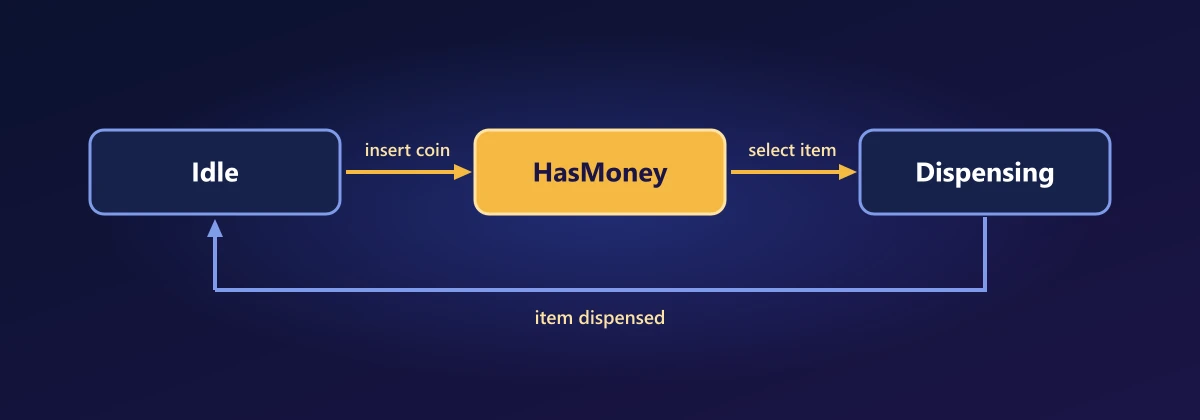
In LLD problems: A vending machine is the standard one: Idle, HasMoney, Dispensing and OutOfStock, where pressing the same button does something different in each. An elevator car is another (Idle, MovingUp, MovingDown, DoorsOpen): a call from a floor it has already passed is served now when idle and queued when moving.
Iterator
Intent: walk through a collection without exposing how it is stored. You rarely write this one in C#, because IEnumerable and IEnumerator are the Iterator pattern and foreach is its syntax. Spelled out by hand, it looks like this:
int[] array = [1, 2, 3, 4, 5, 6];

var iterator = array.GetEnumerator();
while (iterator.MoveNext())
{
    Console.WriteLine(iterator.Current);
}
To make your own type iterable, return IEnumerable<T> and use yield return. The compiler writes the iterator class for you.
| Iterator | |
|---|---|
| Use it when | Callers have to walk a collection, a tree, a file or a paged API result without depending on how it is stored, or the items should be produced only as they are asked for. |
| Benefits | One foreach works on everything. With yield return, a huge or endless sequence costs no memory, and every LINQ operator works on it. |
| Drawbacks | A lazy sequence runs again every time it is enumerated, and it runs where it is enumerated and not where it was written, which surprises people when the source has changed or been disposed by then. Changing a collection while iterating over it throws. |
In LLD problems: A music player walks the same playlist in order, in reverse or shuffled, and each is a different iterator over one list of songs. In a library management system a catalogue search returns an IEnumerable<Book>, so the caller pages through the results without knowing whether they came from a list, an index or a database.
Mediator
Intent: let a set of objects talk to each other through one object in the middle, so none of them needs a reference to any other. The textbook version has an IMediator interface, a concrete mediator that knows every colleague, and a colleague base class that holds the mediator. Declaratively, a colleague is a delegate and the mediator is a dictionary from message type to the delegates that want that message.
var mediator = new Mediator();

// Three colleagues. None of them holds a reference to another.
mediator.Register<string>(message => Console.WriteLine("Colleague1 received " + message));
mediator.Register<string>(message => Console.WriteLine("Colleague2 received " + message));
mediator.Register<int>(number => Console.WriteLine("Colleague3 received " + number));

mediator.Send("Hello"); // Colleague1 and Colleague2
mediator.Send(42);      // Colleague3 only

internal class Mediator
{
    // The message type is the routing key
    private readonly Dictionary<Type, List<Delegate>> handlers = [];

    public void Register<T>(Action<T> handler)
    {
        if (!handlers.TryGetValue(typeof(T), out var list)) handlers[typeof(T)] = list = [];
        list.Add(handler);
    }

    public void Send<T>(T message)
    {
        if (!handlers.TryGetValue(typeof(T), out var list)) return;
        foreach (var handler in list) ((Action<T>)handler)(message);
    }
}
It looks like Observer, and the difference is who knows whom. An observer subscribes to one particular publisher. Here the sender and the receivers know only the mediator and the message type, so either side can be replaced without the other noticing. This is the idea behind the MediatR library and the messenger classes in MVVM toolkits.
| Mediator | |
|---|---|
| Use it when | Many objects affect each other and the references between them have become a tangle: controls in a dialog, requests and their handlers in an application layer, participants in a chat. |
| Benefits | Many-to-many links become many-to-one. Each colleague can be reused and tested alone, and the rules of interaction sit in one place. |
| Drawbacks | The mediator can grow into a class that knows everything. With dispatch by message type, the editor's go to definition no longer leads from the sender to the handler, and in the version above a message with no handler is dropped silently. |
In LLD problems: The elevator controller is a mediator: hall buttons, cars and doors all report to it, and no button ever calls a car directly. A chat room is the other common one. A user sends a message to the room, and the room decides who receives it.
Memento
Intent: capture an object's state so it can be restored later, without exposing its internals. The classic version needs a memento class that copies every field, and a caretaker that stores mementos. A record is immutable, so the current state is already a safe snapshot, and a Stack<T> is the caretaker.
var editor = new Editor();
editor.Type("Hello");
editor.Type(" World");
Console.WriteLine(editor); // Hello World
editor.Undo();
Console.WriteLine(editor); // Hello

// The memento: an immutable snapshot of the editor's state
internal record EditorState(string Text, int Cursor);

internal class Editor
{
    private EditorState state = new("", 0);
    private readonly Stack<EditorState> history = new();

    public void Type(string text)
    {
        history.Push(state); // nothing to copy: a record cannot change after it is made
        state = state with { Text = state.Text + text, Cursor = state.Cursor + text.Length };
    }

    public void Undo()
    {
        if (history.TryPop(out var previous)) state = previous;
    }

    public override string ToString() => state.Text;
}
The with expression builds the next state from the current one and leaves the old one untouched, which is why pushing it onto the stack is enough. This is the Undo that the Command section left out: keep the state before each command and pop it to go back. The record is declared inside the assembly and the history stack is private, so callers can undo without ever seeing what a state contains.
| Memento | |
|---|---|
| Use it when | You need undo, a rollback after a failed operation, checkpoints or drafts. |
| Benefits | State is restored exactly without opening up the object's fields. With an immutable record, taking the snapshot costs nothing. |
| Drawbacks | A snapshot per change adds up when the state is large, so cap the history or store the changes instead (commands). Only what is in the record is restored: an email already sent or a row already written stays that way. |
In LLD problems: A chess game keeps a snapshot of the board before each move, so taking a move back means restoring the previous snapshot. A text editor does the same for undo when it stores document states instead of commands.
Visitor
Intent: add a new operation to a family of classes without changing those classes. The classic version uses double dispatch: every class gets an Accept method that calls back the right Visit overload on the visitor.
Shape[] shapes = [new Circle(1), new Rectangle(2, 3)];
foreach (var shape in shapes) Console.WriteLine(shape.Accept(new AreaVisitor()));

internal interface IVisitor<T>
{
    T Visit(Circle circle);
    T Visit(Rectangle rectangle);
}

internal abstract record Shape
{
    public abstract T Accept<T>(IVisitor<T> visitor);
}

internal record Circle(double Radius) : Shape
{
    public override T Accept<T>(IVisitor<T> visitor) => visitor.Visit(this);
}

internal record Rectangle(double Width, double Height) : Shape
{
    public override T Accept<T>(IVisitor<T> visitor) => visitor.Visit(this);
}

internal class AreaVisitor : IVisitor<double>
{
    public double Visit(Circle circle) => Math.PI * circle.Radius * circle.Radius;
    public double Visit(Rectangle rectangle) => rectangle.Width * rectangle.Height;
}
Every new operation is a new visitor class, and every shape carries an Accept method that exists only for this plumbing. Pattern matching does the same dispatch in the language. A switch expression picks the branch by the runtime type, so an operation becomes a function and the shapes become plain records:
Shape[] shapes = [new Circle(1), new Rectangle(2, 3)];
foreach (var shape in shapes) Console.WriteLine($"{Describe(shape)} has area {Area(shape):F2}");
// Circle of radius 1 has area 3.14
// 2 by 3 rectangle has area 6.00

// Each new operation is one function. The shapes are never touched.
static double Area(Shape shape) => shape switch
{
    Circle c    => Math.PI * c.Radius * c.Radius,
    Rectangle r => r.Width * r.Height,
    _           => throw new ArgumentException($"Unknown shape {shape}"),
};

static string Describe(Shape shape) => shape switch
{
    Circle c    => $"Circle of radius {c.Radius}",
    Rectangle r => $"{r.Width} by {r.Height} rectangle",
    _           => throw new ArgumentException($"Unknown shape {shape}"),
};

internal abstract record Shape;
internal record Circle(double Radius) : Shape;
internal record Rectangle(double Width, double Height) : Shape;
There is one trade to know about. Add a Triangle to the classic version and the compiler stops at every visitor until it has a Visit(Triangle). The switch version still compiles and throws from the discard arm at runtime, because C# cannot know that the list of shapes is closed. Use the switch when operations change more often than the types do, and keep the classic visitor when a missed case must be a compile error.
| Visitor | |
|---|---|
| Use it when | The set of types is stable and the set of operations over them keeps growing: syntax trees, document elements, export to several formats. |
| Benefits | A new operation is a new function or class and the types are not touched. Everything belonging to one operation is in one place instead of spread across the types. |
| Drawbacks | Adding a type means updating every operation. Operations work from outside the types, so the types must expose the data that the operations need. |
In LLD problems: In a file system the items are files and folders, and operations such as total size, search and virus scan keep being added: each one is a visitor and the item classes stay as they are. In a shopping cart, tax and shipping are worked out differently for books, food and electronics without putting those rules inside the item classes.
Interpreter
Intent: describe the grammar of a small language as a tree of objects, and evaluate a sentence by walking that tree. In the textbook each grammar rule is a class with its own Interpret method. With records and a switch expression the grammar is one line per rule and the interpreter is one function.
var expression = Parse("1 2 + 3 *");
Console.WriteLine($"{Show(expression)} = {Evaluate(expression)}"); // ((1 + 2) * 3) = 9

// Postfix needs no brackets or precedence rules, so the parser is a stack
static Expr Parse(string postfix)
{
    var stack = new Stack<Expr>();
    foreach (var token in postfix.Split(' '))
    {
        if (int.TryParse(token, out var value)) { stack.Push(new Number(value)); continue; }

        var right = stack.Pop();
        var left = stack.Pop();
        stack.Push(token == "+" ? new Add(left, right) : new Multiply(left, right));
    }
    return stack.Pop();
}

// One interpreter gives the sentence its value
static int Evaluate(Expr expr) => expr switch
{
    Number n   => n.Value,
    Add a      => Evaluate(a.Left) + Evaluate(a.Right),
    Multiply m => Evaluate(m.Left) * Evaluate(m.Right),
    _          => throw new ArgumentException($"Unknown expression {expr}"),
};

// Another prints it. The grammar below did not change.
static string Show(Expr expr) => expr switch
{
    Number n   => n.Value.ToString(),
    Add a      => $"({Show(a.Left)} + {Show(a.Right)})",
    Multiply m => $"({Show(m.Left)} * {Show(m.Right)})",
    _          => throw new ArgumentException($"Unknown expression {expr}"),
};

// The grammar: one record per rule
internal abstract record Expr;
internal record Number(int Value) : Expr;
internal record Add(Expr Left, Expr Right) : Expr;
internal record Multiply(Expr Left, Expr Right) : Expr;
Look at what it is made of. The tree is a Composite: an Add holds two expressions that may themselves be Adds. Each function over the tree is a Visitor written as a switch. So a second interpreter, such as Show, costs one more function and no change to the grammar. You have used this pattern without writing it: Regex interprets a pattern language, and LINQ providers such as Entity Framework walk expression trees to turn a lambda into SQL.
| Interpreter | |
|---|---|
| Use it when | A small, well-defined language keeps coming up: filter and search expressions, formulas, business rules, conditions in configuration. |
| Benefits | The grammar is easy to read and extend, and the same tree can be evaluated, printed, simplified or translated (to SQL, for example) by separate functions. |
| Drawbacks | It only suits small grammars, and a real language needs a proper parser. Walking a tree is slow next to compiled code. A language of your own also needs error messages, documentation and people willing to learn it. |
In LLD problems: A spreadsheet is the classic case: a formula such as =A1+B2*2 is parsed into a tree and evaluated whenever a cell changes. A rule engine for discounts or search filters (category = books AND price > 500) is the same idea with a different grammar.
Wrapping Up
Most of this lesson was one idea: behaviour passed in as a delegate. Strategy keeps a delegate in a field, Command keeps delegates in a dictionary, Chain of Responsibility keeps them in a list and Mediator keeps them by message type. Observer is an event and Iterator is foreach. Records gave us Memento, and pattern matching did the work of Visitor and Interpreter.
That completes the course. All of the code is in the DesignPatterns-Using-Csharp repository as a single console app. Clone it, run it and change the examples. And when you next reach for a pattern, first ask whether a language feature already expresses it.
Comments