Design Patterns CourseLesson 2 of 4 18 min
Creational Design Patterns in C#
Creational patterns are about how objects get made. Writing new in the middle of your code ties that code to one concrete class and to everything its constructor needs. Each creational pattern puts something between the caller and new (a method, a factory object, a builder or an existing object to copy), so that which class is created, how it is put together and how many instances exist can change without the caller changing.
This lesson covers six of them: Simple Factory, Factory Method, Abstract Factory, Builder, Singleton and Prototype. Simple Factory is not one of the Gang of Four's twenty-three, but the other factories are easier to follow once you have seen it. Each section gives the intent of the pattern in one line and then the smallest C# that expresses it. It ends with a short table of when to use the pattern, what it gives you and what it costs, and with where the pattern turns up in well-known low-level design (LLD) interview problems such as the parking lot, the elevator and the vending machine. The code is in the DesignPatterns-Using-Csharp repository.
Simple Factory
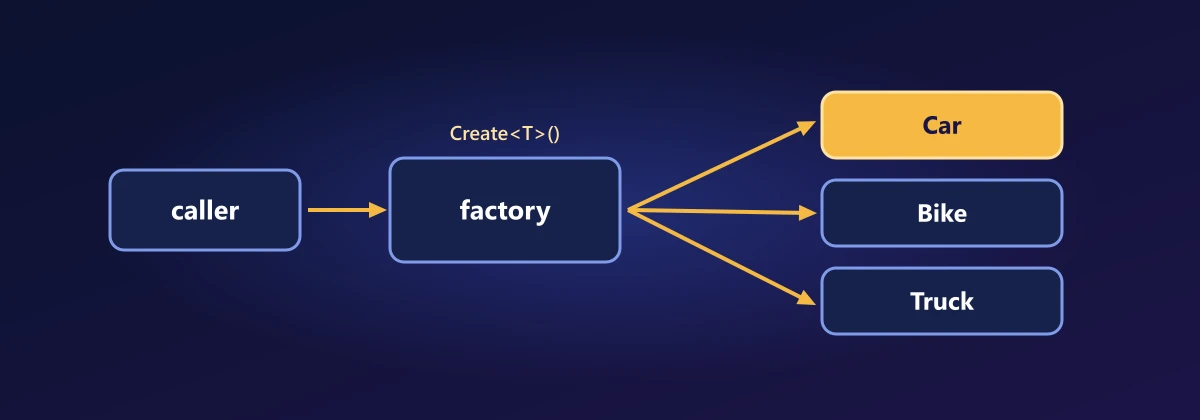
Intent: hide object creation behind a method. The old way takes a string or enum parameter and switches on it. With a generic method and the new() constraint, the type itself is the parameter and the compiler checks it:
var factory = new SimpleFactory();
var product1 = factory.CreateProduct<Product1>();
var product2 = factory.CreateProduct<Product2>();

internal class SimpleFactory
{
    public T CreateProduct<T>() where T : IProduct, new() => new T();
}| Simple Factory | |
|---|---|
| Use it when | The same creation code is repeated, or callers should not name the concrete classes. |
| Benefits | Construction is in one place and callers depend only on the interface. |
| Drawbacks | The generic version needs a public constructor with no parameters, and the type must be known at compile time, so choosing from a string at runtime brings back a switch or a dictionary. Where dependency injection is in use, the container is already this factory. |
In LLD problems: The entry gate of a parking lot reads a vehicle type and needs the matching object (Car, Bike or Truck), which a factory creates so the gate has no switch of its own. A chess board is set up the same way, by asking a factory for each piece by kind.
Factory Method
Intent: let each factory decide which concrete product to create. Every factory implements the same interface and returns its own family of products. The cost is that the number of product classes grows as factories times products.
IFactory factory1 = new Factory1();
IFactory factory2 = new Factory2();
var a = factory1.CreateProduct("Product1"); // Factory1Product1
var b = factory2.CreateProduct("Product2"); // Factory2Product2

public interface IFactory
{
    IProduct CreateProduct(string productType);
}

internal class Factory1 : IFactory
{
    public IProduct CreateProduct(string productType) =>
        productType == "Product1" ? new Factory1Product1() : new Factory1Product2();
}

internal class Factory2 : IFactory
{
    public IProduct CreateProduct(string productType) =>
        productType == "Product1" ? new Factory2Product1() : new Factory2Product2();
}| Factory Method | |
|---|---|
| Use it when | A base class or framework knows when an object is needed but not which one, and subclasses or plug-ins decide: document types in an application framework, a parser per file format. |
| Benefits | New products are added without changing the code that uses them, and creation can be overridden in tests. |
| Drawbacks | The hierarchies run in parallel, so a new product tends to need a new creator. When creation is the only thing that differs, passing a Func<IProduct> does the same job with no subclass. |
In LLD problems: In a notification system each channel has its own creator: the email creator makes email notifications and the SMS creator makes SMS ones, and the code that sends them only sees the creator interface. A logging framework does the same with sinks (file, console, database).
Abstract Factory
Intent: create families of related objects. Look at the class count in the Factory Method section: every factory needs its own copy of every product, so classes = factories × products. Two factories and two products already means four product classes, and three of each means nine. That multiplication is the signature of inheritance doing a job that composition does better.
Compose instead. Give the product its factory and let the product ask the factory for its parts. The product class decides what the product is, and the injected factory decides its flavour. A default interface method (C# 8 and later) lets every factory share one generic CreateProduct, so classes = factories + products.
IFactory factory1 = new Factory1();
IFactory factory2 = new Factory2();
Console.WriteLine(factory1.CreateProduct<Product1>()); // Product1 with Factory1 part
Console.WriteLine(factory2.CreateProduct<Product1>()); // Product1 with Factory2 part
Console.WriteLine(factory2.CreateProduct<Product2>()); // Product2 with Factory2 part

public interface IProduct
{
    IFactory Factory { get; set; }
}

public interface IFactory
{
    string CreatePart(); // what makes each factory's family different

    // Shared by every factory: inject this factory into the product
    IProduct CreateProduct<T>() where T : IProduct, new() => new T { Factory = this };
}

class Factory1 : IFactory { public string CreatePart() => "Factory1 part"; }
class Factory2 : IFactory { public string CreatePart() => "Factory2 part"; }

class Product1 : IProduct
{
    public IFactory Factory { get; set; } = null!;
    public override string ToString() => "Product1 with " + Factory.CreatePart();
}

class Product2 : IProduct
{
    public IFactory Factory { get; set; } = null!;
    public override string ToString() => "Product2 with " + Factory.CreatePart();
}
The same Product1 class comes out differently depending on which factory made it. Adding a factory or a product now adds one class instead of a whole row or column.
Easy way to remember: Factory Method multiplies (factories × products, inheritance), and Abstract Factory adds (factories + products, composition). One rule keeps it honest: the product must use what the factory gives it. A factory that is stored in the product but never asked for anything changes nothing.
| Abstract Factory | |
|---|---|
| Use it when | Objects come in families that must be used together: the controls of a theme, the connection, command and parameter of a database provider (DbProviderFactory in .NET), the parts for a country or platform. |
| Benefits | Parts of two families cannot be mixed by accident, and switching family is a change in one line where the factory is chosen. |
| Drawbacks | A new kind of product changes the factory interface and every factory. It is indirection for nothing until a second family exists. In the composition version above, a product created without a factory is incomplete, since its Factory is null. |
In LLD problems: A car rental system has tiers, and each tier needs a matching set: the economy factory gives an economy vehicle, its insurance plan and its price rule, and the luxury factory gives the luxury set, so the parts of two tiers are never mixed. A checkout that sells in several countries needs a matching tax calculator, invoice format and payment gateway for each country.
Builder
Intent: build a complex object step by step. A fluent builder returns this from each setter, so construction reads like a sentence and you set only what you need.
var builder = new Builder()
    .SetProperty1("Property1")
    .SetProperty2("Property2");

Console.WriteLine(builder.SetProperty3("Property3"));

internal class Builder
{
    public string? Property1 { get; private set; }
    public string? Property2 { get; private set; }
    public string? Property3 { get; private set; }

    public Builder SetProperty1(string value) { Property1 = value; return this; }
    public Builder SetProperty2(string value) { Property2 = value; return this; }
    public Builder SetProperty3(string value) { Property3 = value; return this; }

    public override string ToString() => $"{Property1} {Property2} {Property3}";
}
For simple data, C# object initializers and records with init properties often make a separate builder unnecessary. A builder earns its place when construction has rules or many optional steps.
| Builder | |
|---|---|
| Use it when | An object has many optional parts, or has to be put together in steps and checked at the end: queries, HTTP requests, test data, application configuration (WebApplication.CreateBuilder). |
| Benefits | Construction is readable and replaces a constructor with ten parameters. The final Build step can validate and return an immutable object. |
| Drawbacks | It is a second class that mirrors the first. Nothing makes the caller set a required part, so that mistake moves from compile time to runtime. For simple cases, required and init properties are enough. |
In LLD problems: A food ordering system builds a pizza or a meal step by step from a size, a base and any number of optional toppings. Setting up a parking lot for a test reads well as a builder too: add three floors, add twenty car slots to each, add two entry gates, then Build.
Singleton
Intent: make sure a class has exactly one instance. Getting it thread safe by hand is easy to get wrong. Jon Skeet's Implementing the Singleton Pattern in C# covers every version. In practice, Lazy<T> is enough, and in ASP.NET Core you should usually register the service as a singleton in dependency injection instead.
public sealed class Settings
{
    private static readonly Lazy<Settings> instance = new(() => new Settings());
    public static Settings Instance => instance.Value;

    private Settings() { }
}| Singleton | |
|---|---|
| Use it when | There must be exactly one shared instance of something expensive or coordinating: configuration, a cache, a connection pool, a logger. |
| Benefits | One instance, created on first use, that every part of the program sees in the same state. |
| Drawbacks | It is global state: the dependency is hidden, tests affect each other and a fake is hard to put in its place. Everything shares it, so it must be thread safe. And it is one per process, so two servers have two. |
In LLD problems: The ParkingLot object, the elevator controller and the logger in a logging framework are usually modelled as singletons, because the system has one of each and every gate, button or class must see the same one. In an interview, say that you would register it once in dependency injection, which keeps it testable.
Prototype
Intent: create a new object by copying an existing one instead of building it from scratch. The old way is ICloneable or a hand-written Clone method that copies each field, and it has to be kept up to date whenever a field is added. A record gets its clone method from the compiler, and the with expression calls it.
var prototype = new Product("Product1", 10, ["tag1"]);

var copy = prototype with { };                      // a clone
var variant = prototype with { Name = "Product2" }; // a clone with one change

Console.WriteLine(copy == prototype);                // True: same values
Console.WriteLine(ReferenceEquals(copy, prototype)); // False: a different object
Console.WriteLine(variant);

variant.Tags.Add("tag2");
Console.WriteLine(prototype.Tags.Count);             // 2: the copy is shallow, so the list is shared

internal record Product(string Name, int Price, List<string> Tags);
The last line is the catch. The copy is shallow: each property is copied, and a property that refers to a mutable object, such as the List here, ends up shared by the original and the clone. Give a record immutable members (ImmutableList<T>, or other records) and the shared reference stops mattering, because nobody can change it.
| Prototype | |
|---|---|
| Use it when | An object is expensive to create or was configured at runtime, and you need copies with small changes: templates, defaults, a duplicate feature, variations of test data. |
| Benefits | Costly setup is not repeated and the caller does not need to know the concrete type. With a record the clone is free and cannot fall out of date when a property is added. |
| Drawbacks | Deep copies are the difficulty: nested objects and circular references have to be copied by hand. A copy also carries over things that should be unique, such as an id or a created date. |
In LLD problems: A chess engine clones the board to try a move without disturbing the real game. A calendar creates each occurrence of a weekly meeting by copying the first one and changing the date.
Wrapping Up
Four language features did most of the work in this lesson. A generic method with the new() constraint is a factory. A default interface method lets every factory share one way of creating products. Lazy<T> is a thread-safe singleton, and a record knows how to clone itself. Only Factory Method still needs a class hierarchy, and even there a Func<IProduct> is often enough.
The next lesson moves from making objects to putting them together: the structural patterns.
Comments