Design Patterns CourseLesson 3 of 4 31 min
Structural Design Patterns in C#
Structural patterns are about how objects are put together. They build larger structures out of small objects by wrapping one object in another, joining two that do not fit, arranging them in a tree or sharing one among many. The aim is that a part can be added, replaced or shared without its callers changing.
This lesson covers the seven structural patterns: Decorator, Adapter, Facade, Bridge, Composite, Flyweight and Proxy. It ends with Repository, which is not one of the Gang of Four's patterns (it comes from Martin Fowler's Patterns of Enterprise Application Architecture) but is found in almost every .NET codebase. Each section gives the intent of the pattern in one line and then the smallest C# that expresses it. It ends with a short table of when to use the pattern, what it gives you and what it costs, and with where the pattern turns up in well-known low-level design (LLD) interview problems such as the parking lot, the elevator and the vending machine. The code is in the DesignPatterns-Using-Csharp repository.
Decorator
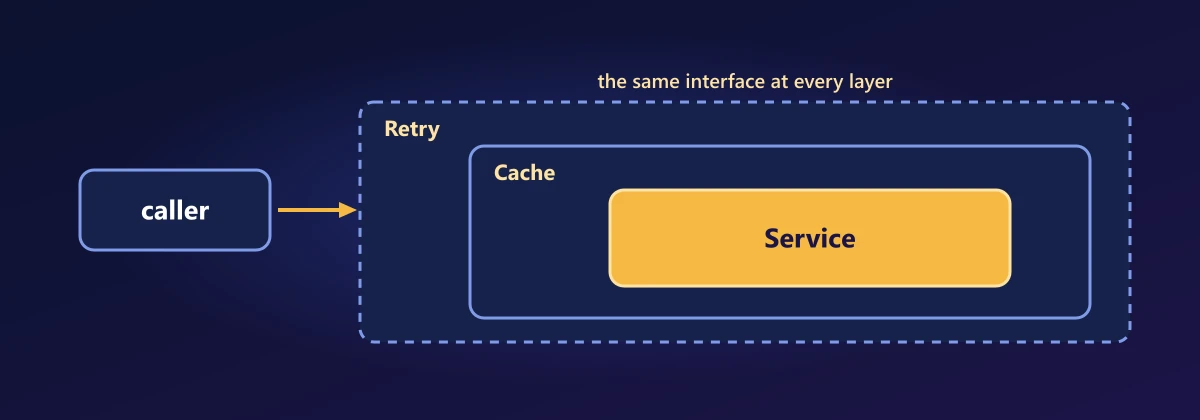
Intent: add behaviour to an object without changing it or subclassing it. The decorator implements the same interface and wraps the original. Because a decorator is itself an IOriginal, you can wrap as many times as you like without writing a new class for each combination.
var original = new Original();
var decorated = new DecoratedOriginal(original);
var doubleDecorated = new DecoratedOriginal(decorated);

Console.WriteLine(original.DoWork());        // Original Work
Console.WriteLine(decorated.DoWork());       // Decorated Original Work
Console.WriteLine(doubleDecorated.DoWork()); // Decorated Decorated Original Work

internal interface IOriginal
{
    string DoWork();
}

internal class Original : IOriginal
{
    public string DoWork() => "Original Work";
}

internal class DecoratedOriginal : IOriginal
{
    private readonly IOriginal original;
    public DecoratedOriginal(IOriginal original) => this.original = original;

    public string DoWork() => "Decorated " + original.DoWork();
}| Decorator | |
|---|---|
| Use it when | Optional behaviour has to be added around an object in any combination: logging, caching, retry or compression around a service or a stream (GZipStream over FileStream). |
| Benefits | Behaviours combine freely with no subclass per combination, each decorator does one job, and the original class is not changed. |
| Drawbacks | The order of wrapping changes the result (a cache outside a retry is not a cache inside one). A decorator must forward every member of the interface, which is tedious for a wide one, and many thin layers make stack traces longer. |
In LLD problems: The coffee shop or pizza order is the usual one: milk, an extra shot or extra cheese each wrap the item and add to its price and description. A parking fee works the same way, with EV charging, valet and car wash each wrapping the base fee.
Adapter
Intent: make an existing class fit the interface a caller expects. Here the adaptee returns an int and the caller wants a bool, so the adapter wraps it and translates.
IAdapter adapter = new Adapter(new Adaptee());
Console.WriteLine(adapter.AdaptedMethod()); // True

internal interface IAdaptee { int AdapteeMethod(); }
internal interface IAdapter { bool AdaptedMethod(); }

internal class Adaptee : IAdaptee
{
    public int AdapteeMethod() => 1;
}

internal class Adapter : IAdapter
{
    private readonly IAdaptee adaptee;
    public Adapter(IAdaptee adaptee) => this.adaptee = adaptee;

    public bool AdaptedMethod() => adaptee.AdapteeMethod() > 0;
}| Adapter | |
|---|---|
| Use it when | A class you cannot change (third party or legacy) has to fit an interface your code expects, or you want your code kept apart from a vendor's API. |
| Benefits | The rest of the code depends on your own interface, the translation is in one place, and changing vendor means writing one new adapter. |
| Drawbacks | It is one more class and one more layer for each adaptee. When the two models differ a lot, the adapter fills with conversion logic, and features of the adaptee that the common interface cannot express are lost. |
In LLD problems: A payment system talks to several providers, each with its own SDK, and an adapter per provider makes them all look like one IPaymentProcessor. In a parking lot the number plate camera and the card reader come from different vendors, and adapters fit them to the interfaces the lot expects.
Facade
Intent: give a simple front door to a set of more complicated objects. The caller makes one call, and the facade coordinates everything behind it. LINQ keeps the coordination to a single expression.
var facade = new Facade([new Adaptee(), new Adaptee(), new Adaptee()]);
Console.WriteLine(facade.ShowFacade()); // True True True

internal class Facade
{
    private readonly List<IAdaptee> adaptees;
    public Facade(List<IAdaptee> adaptees) => this.adaptees = adaptees;

    public string ShowFacade() =>
        string.Join(" ", adaptees.Select(a => (a.AdapteeMethod() > 0).ToString()));
}| Facade | |
|---|---|
| Use it when | A subsystem has many classes that must be called in the right order, and most callers want only a few common operations. |
| Benefits | Callers get one simple entry point and no longer depend on the classes behind it, which are then free to change. |
| Drawbacks | A facade tends to grow into a god class as every new need gets a method. It also hides options, so keep the subsystem reachable for the callers whose needs it does not cover. |
In LLD problems: In a movie ticket booking system, one BookTicket call locks the seats, takes the payment, issues the ticket and sends the confirmation. A parking lot exit gate makes one call with the ticket, and behind it the fee is calculated, the payment is taken, the slot is freed and the barrier opens.
Bridge
Intent: separate an abstraction from its implementation so the two can vary independently. It looks like Strategy from the next lesson, except the side holding the implementation is also abstract. A default interface method gives every implementation shared behaviour with no base class.
IAbstraction abstraction = new Abstraction1(new Implementation1());
Console.WriteLine(abstraction.DoWork());
abstraction = new Abstraction2(new Implementation2()); // either side can change on its own
Console.WriteLine(abstraction.DoWork());

internal interface IImplementation
{
    string DoWork() => $"{this} Work"; // default interface method
}

internal class Implementation1 : IImplementation { }
internal class Implementation2 : IImplementation { }

internal interface IAbstraction
{
    string DoWork();
}

internal class Abstraction1 : IAbstraction
{
    private readonly IImplementation implementation;
    public Abstraction1(IImplementation implementation) => this.implementation = implementation;

    public string DoWork() => this + " " + implementation.DoWork();
}

internal class Abstraction2 : IAbstraction
{
    private readonly IImplementation implementation;
    public Abstraction2(IImplementation implementation) => this.implementation = implementation;

    public string DoWork() => this + " " + implementation.DoWork() + " better than others";
}| Bridge | |
|---|---|
| Use it when | Two things vary independently, usually what an object is and how or where it does its work, and inheritance would need a class for every combination. |
| Benefits | The class count is the sum instead of the product, the implementation can be swapped at runtime, and each side is developed and tested separately. |
| Drawbacks | You have to see the two dimensions before you build. With only one of them varying it is indirection for nothing, and the interface between the two sides is hard to change later because both hierarchies depend on it. |
In LLD problems: A notification system has kinds of message (alert, reminder, promotion) and channels (email, SMS, push). With a bridge the kind holds a channel, so three kinds and three channels take six classes instead of nine. A drawing application splits shapes from renderers (screen, PDF, printer) the same way.
Composite
Intent: treat a single item and a group of items the same way. Both the leaf and the container implement one interface (with operations such as Add, Remove and a shared action), so a container can hold leaves and other containers, and the whole tree can be traversed with one recursive call. File systems, UI control trees and menus are all composites.
| Composite | |
|---|---|
| Use it when | The data is a tree of parts and wholes, and callers should not care which one they hold: file systems, control trees, menus, organisation charts, bills of materials. |
| Benefits | Client code is one recursive call with no type checks, and a new kind of node fits in without changing the callers. |
| Drawbacks | The shared interface is a compromise. Add and Remove mean nothing on a leaf, so either they throw at runtime or they are left off and callers check the type after all. It is also hard to restrict what a container may hold. |
In LLD problems: A file system is the standard example: a folder holds files and other folders, and asking any of them for its size works the same way. A parking lot is also a tree of lot, floors and slots, so the free count can be asked at any level and each level adds up the level below.
Flyweight
Intent: share one object among many users instead of creating thousands of identical ones. The state everyone has in common (intrinsic) lives in the shared object, and the state that differs each time (extrinsic) is passed in by the caller. The classic version has a flyweight factory that checks a dictionary and creates the object if it is missing. ConcurrentDictionary.GetOrAdd is exactly that check, and passing the creation step as a Func gives one generic class that serves every type.
using System.Collections.Concurrent;

var fonts = new Flyweight<(string Name, int Size), Font>(key => new Font(key.Name, key.Size));

var a = fonts.Get(("Arial", 12));
var b = fonts.Get(("Arial", 12));
var c = fonts.Get(("Arial", 14));

Console.WriteLine(ReferenceEquals(a, b)); // True: one shared object
Console.WriteLine(fonts.Count);           // 2 fonts, however many characters use them

// The position differs for every character, so it is passed in, not stored
Console.WriteLine(a.Draw('H', 0));        // H at 0 in Arial 12
Console.WriteLine(c.Draw('i', 1));        // i at 1 in Arial 14

internal record Font(string Name, int Size)
{
    public string Draw(char character, int position) => $"{character} at {position} in {Name} {Size}";
}

internal class Flyweight<TKey, TValue> where TKey : notnull
{
    private readonly ConcurrentDictionary<TKey, TValue> cache = new();
    private readonly Func<TKey, TValue> create;

    public Flyweight(Func<TKey, TValue> create) => this.create = create;

    // Create on first request, share on every later one
    public TValue Get(TKey key) => cache.GetOrAdd(key, create);
    public int Count => cache.Count;
}
A document with a million characters still holds only a handful of Font objects. Two rules keep a flyweight correct. The shared object must be immutable, since a change made through one reference would be seen through all of them, and a record gives that by default. And nothing that varies per use may be stored in it, which is why the position is a parameter of Draw. The runtime does the same with strings: literals are interned, so equal literals are one object.
| Flyweight | |
|---|---|
| Use it when | A very large number of objects share most of their data and memory is a measured problem: glyphs, map tiles, particles, repeated strings from parsing. |
| Benefits | Much less memory and far fewer allocations, and two equal values are the same object. |
| Drawbacks | The state is split in two and callers have to carry the part that varies. The cache never shrinks unless you evict from it, so with many distinct keys it becomes a leak. Each lookup costs time, so measure before using it. |
In LLD problems: A chess set has sixteen pawns but needs only one object describing how a pawn moves, with the square each one stands on kept outside it. A game map with ten thousand trees shares one model and texture per kind of tree, and keeps only a position for each.
Proxy
Intent: put a stand-in in front of an object to control access to it, so the stand-in can log the call, check permissions, cache the answer or delay creating the real object. Written by hand, a proxy has the same structure as the Decorator above: a class that implements the interface and wraps the real object. Only the purpose differs. A decorator adds to what the object does, and a proxy decides whether and when the call reaches it. The cost is one proxy class per interface, with one forwarding method per member.
DispatchProxy removes that cost. The runtime generates the class that implements the interface and routes every call to a single Invoke method, so one generic proxy serves every interface:
using System.Reflection;

// The caller asks for an IService and cannot tell it was handed a proxy
IService service = LoggingProxy<IService>.Create(new Service());
Console.WriteLine(service.DoWork("request 1"));
// Proxy: calling DoWork
// Proxy: DoWork returned
// Work done for request 1

public interface IService
{
    string DoWork(string input);
}

internal class Service : IService
{
    public string DoWork(string input) => "Work done for " + input;
}

// One proxy class for every interface: the runtime writes the implementation of T
public class LoggingProxy<T> : DispatchProxy where T : class
{
    private T target = null!;

    public static T Create(T target)
    {
        var proxy = Create<T, LoggingProxy<T>>();
        ((LoggingProxy<T>)(object)proxy).target = target;
        return proxy;
    }

    // Every call on the interface arrives here
    protected override object? Invoke(MethodInfo? method, object?[]? args)
    {
        Console.WriteLine($"Proxy: calling {method!.Name}");
        var result = method.Invoke(target, args);
        Console.WriteLine($"Proxy: {method.Name} returned");
        return result;
    }
}
This is how mocking libraries and interception in dependency injection containers work. Two things to know: the class is generated at runtime, so DispatchProxy is not available under Native AOT, and each call goes through reflection, so keep it off hot paths. For the lazy kind of proxy you need no class at all. Lazy<T>, which the Singleton section used, creates the real object on first use.
| Proxy | |
|---|---|
| Use it when | Access to an object has to be controlled without changing it or its callers: lazy loading, remote calls (a gRPC client is a proxy), access checks, caching, rate limiting. |
| Benefits | The callers' code does not change, and a concern that cuts across many classes is written once. |
| Drawbacks | A call that looks local may be slow or may fail, as with a remote proxy, and nothing at the call site says so. A proxy built on reflection costs time on every call and makes stack traces harder to read. |
In LLD problems: A rate limiter is a proxy in front of a service: it counts each caller's requests and lets a call through only while the caller is under the limit. In a library or document management system, a proxy checks the member's role before a call to remove a book or open a file reaches the real object.
Repository
Intent: make stored data look like an in-memory collection, so the code that holds the business rules asks for objects and never sees SQL, files or HTTP. The usual version has one interface and one class for every entity (IVehicleRepository, ITicketRepository and so on), each repeating the same four methods. Generics remove the repetition, and a lambda replaces the pile of FindByThis and FindByThat methods.
// The caller sees a collection of vehicles. Where they are kept is the repository's business.
IRepository<Vehicle> vehicles = new InMemoryRepository<Vehicle>(v => v.Id);

vehicles.Add(new Vehicle(1, "KA-01", "Car"));
vehicles.Add(new Vehicle(2, "KA-02", "Bike"));
vehicles.Add(new Vehicle(3, "KA-03", "Car"));

Console.WriteLine(vehicles.Get(2)?.Plate);                  // KA-02
foreach (var car in vehicles.Find(v => v.Type == "Car"))    // the query is a lambda
    Console.WriteLine(car.Plate);                           // KA-01, KA-03

vehicles.Remove(1);
Console.WriteLine(vehicles.Find(_ => true).Count());        // 2

public interface IRepository<T> where T : class
{
    T? Get(int id);
    IEnumerable<T> Find(Func<T, bool> predicate);
    void Add(T item);
    void Remove(int id);
}

// One generic class serves every entity. A database version implements the same interface.
internal class InMemoryRepository<T> : IRepository<T> where T : class
{
    private readonly Dictionary<int, T> items = [];
    private readonly Func<T, int> getId;

    public InMemoryRepository(Func<T, int> getId) => this.getId = getId;

    public T? Get(int id) => items.GetValueOrDefault(id);
    public IEnumerable<T> Find(Func<T, bool> predicate) => items.Values.Where(predicate);
    public void Add(T item) => items[getId(item)] = item;
    public void Remove(int id) => items.Remove(id);
}

internal record Vehicle(int Id, string Plate, string Type);
The lambda passed to Find is a Strategy for choosing rows, and the repository is a Facade over the storage. A version backed by a database takes Expression<Func<T, bool>> instead of Func<T, bool>, so that the provider can read the lambda as a tree and turn it into SQL, which is the Interpreter pattern at work. Without that, Find would load every row and filter in memory.
One thing to know before writing your own: in Entity Framework Core, DbSet<T> already is a repository and DbContext already is a unit of work. A generic repository wrapped around them adds a layer and usually takes features away. Write one when it hides something worth hiding, such as a query that several callers share, a second kind of storage, or a cache.
| Repository | |
|---|---|
| Use it when | Business logic should not depend on how data is stored: you want to test it with an in-memory store, you may change the database, or the same queries are repeated in many places. |
| Benefits | Storage can be swapped or faked in tests, each query is written and named once, and data access has one place for caching, logging and access rules. |
| Drawbacks | Over Entity Framework it is a wrapper around something that is already a repository, and it hides Include, projection and change tracking. A generic one drifts towards the lowest common denominator, or leaks IQueryable and stops hiding anything. Changes across several repositories need a unit of work to save them together. |
In LLD problems: In a parking lot the tickets, slots and payments each sit behind a repository, kept in memory during the interview and replaceable by a database later without touching the entry and exit logic. A library management system has a BookRepository and a MemberRepository, with searches such as books by an author or members with overdue loans written once inside them.
Wrapping Up
Most of this lesson was one idea used for different purposes: an object that holds another object and stands in front of it. A Decorator adds to what the inner object does, an Adapter translates its interface, a Proxy controls access to it and a Facade hides several objects behind one. Bridge and Composite are about arrangement, in two layers or in a tree, and Flyweight is about sharing. Repository is the same idea once more, with the storage as the object being stood in front of.
The next lesson is the largest family, the behavioural patterns, where delegates take over most of the work.
Comments